
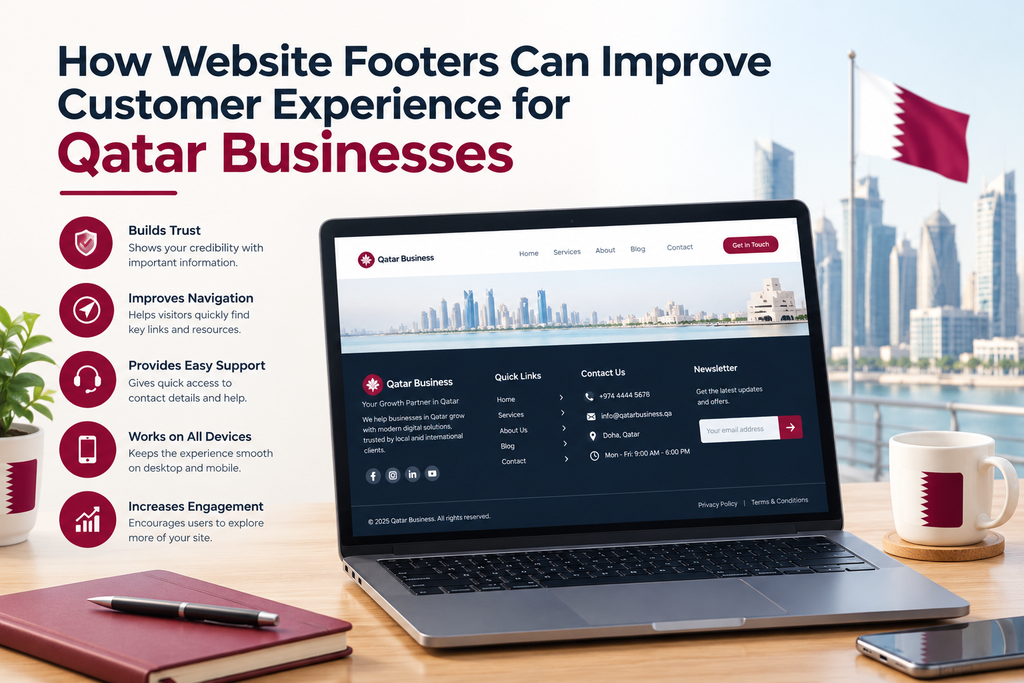
When visiting a website, a user is often focused on the content, images and navigation of the site. However, another way you can improve a customer experience is with your website’s footer.
Your website footer is the section of a website that appears at the bottom of each page. It typically includes contact information, key links, company information and other useful resources.
A well structured website footer will mean your customers can easily find information and know how to contact you as a business in Qatar.
Although a simple section of a website, your footer can assist with navigating your website and having key information available.
What is a Website Footer?
A website footer is the section found at the bottom of a webpage. Most websites will have a similar footer throughout the website so users can easily find key information.
Your website footer could include some or all of the following:
Company name and description
Contact information and business location
Key service links
Privacy policy, terms of service
Social media links
Copyright information.
Some website footers will include ways for users to sign up for a newsletter, FAQs and links to customer support.
Depending on how your website is set up, your footer may be quite simple with just a few useful links or complex for a large online store. The aim of your footer is to offer users helpful information in a concise way.
Why Website Footer Design Matters to Businesses in Qatar
Sometimes users won’t be able to find the information they’re looking for within the website navigation. Therefore they’ll scroll down to the bottom of the page to find contact information, company details and other service links.
If the footer is not well structured, users may struggle to find this information.
A clear website footer will make your website easier to use for your customers wanting to learn more about your company. Having a consistent place to find key links will also assist any businesses with lots of service pages, articles and products.
Whilst a good footer won’t fix any navigation issues, it can help users to navigate your website easily.
1. Easily Accessible Contact Information
One of the most useful things to include in your website footer is your contact information.
Users may scroll to the bottom of a page to contact your company, therefore by having the right contact information included it can save users time.
For example, if your business is based in Doha then including your telephone number, business email and address can be useful. If you accept customer queries via WhatsApp then including a direct link can also be useful.
Ensure your information is accurate and matches what is found on your contact page.
Not all contact information needs to be included. Just include the most relevant information for your customers and ensure it works on desktop and mobile.
2. Improve Navigation
Some users will scroll to the bottom of a page and not find what they’re looking for. A useful website footer will allow users to easily navigate your website.
You can include links to your key service pages, company information, blog and contact page.
A web development agency may include links to ‘Website Development’, ‘E-Commerce’, ‘AI Automation’ and ‘Digital Marketing’.
Ensure your links are grouped into clear sections.
Don’t include links to every page on your website. This can cause your website footer to become hard to read especially on mobile. Just include links to the most relevant pages.
3. Gain Trust with Company Details
When users find a new business they may want to learn more about the company before contacting them.
Within your website footer you can have links to help answer their questions.
Consider including an About Us page, company profile, relevant certifications and other genuine information.
If your company has a physical location then including your address or a link to directions can be helpful.
This can help customers within Qatar to understand who they’re dealing with. Just ensure the information is accurate and relevant.
4. Key Policy Links
Some pages on your website may not be relevant to include within your main navigation. However, they should still be easy to find.
Your website footer is a great place to include links to your privacy policy, terms and conditions, cookies (if relevant) and refund/return policy (if you have an online store).
This will give your users information about how your business operates and how they handle customer information.
For example, an e-commerce website should include easy to find information about delivery, returns and refunds.
Depending on your services, website functions and legal requirements you may need different policies.
Ensure your links are clearly labelled.
5. Mobile Friendly
A website footer may look good on desktop but can become difficult to use on a smartphone due to having too many columns and small text.
As users may view your website on different devices throughout the day, ensure the text is easy to read.
Ensure your text is an easy to read size, there is plenty of space and your website footer will adapt to smaller screens.
You can separate your links into simple sections. Ensure any phone numbers, emails and links are easy to click on. Don’t include too much text that would require users to zoom in.
Ensure your website footer looks good on different screen sizes. Check your links show correctly and your footer is consistent with your website.
6. Brand Consistent
Your website footer should be part of the design of your website.
Ensure your colours, fonts and spacing match your website. You could also include your logo.
A corporate website may have a simple footer with dark colours, clear headings and organised links. A creative business may have a more unique footer but still keep it easy to read.
Don’t include too many colours, fancy designs or animations to make your website footer difficult to navigate.
A clean and consistent website footer will help your whole website look professional.
7. Social Media Links
If your business is active on social media then your website footer can be used to provide users with another way to find your social media.
You can include links to your LinkedIn, Instagram, Facebook and other relevant social media.
This can help interested users to learn more about your work, updates and services.
Only include social media links that your business has. Including broken links or inactive accounts can leave a bad impression.
Ensure your icons are easy to recognise. Include clear titles where needed. Ensure your links open the right social media.
Social media should be used to compliment your website.
8. Not Over Complicated
A common mistake made with website footers is having too much information.
Sometimes businesses will try and include everything such as all their services, all website pages, lots of promotional information and multiple rows of links. This can make your website footer difficult to read.
Decide what information users are most likely to need. Group your links into sections. Use clear, short headings. Get rid of any outdated information.
You could split your website footer into three sections; Services, Company and Contact.
Depending on your website, you’ll want to include useful information.
Common Website Footer Mistakes
Before publishing/updating your website footer check the following:
Links are not broken – Ensure your navigation/social media links are working.
Contact information is up to date – Ensure your telephone number, email and location are correct.
Too many links – Include the most relevant information.
Text is too small – Ensure your text can be easily read.
Not mobile friendly – Ensure your website footer adapts.
No policy pages – Include links to relevant policies.
Not consistent – Ensure your website footer matches your website.
Unnecessary information – Remove old promotions.
Having a quick look through can help keep your website organised and easy to use.
Improving Your Website Footer
Firstly take a look at your current website footer. See what information is included and whether users could easily find your contact information, key services and company information.
Remove any unnecessary links. Split your information into clear sections.
Check your website footer looks good on desktop/mobile. Ensure all of your links work and your contact information and policy pages are correct.
If your website has recently had a redesign then check your website footer to ensure it reflects your current services and website.
You can also use website analytics to see how users are navigating throughout your website.
Small changes can be made to improve your website footer.
Final Thoughts
Although your website footer may be the smallest part of your website, it can still be a useful addition.
It can help users find your contact information, key pages and company information.
Having a clear, accurate and mobile friendly website footer can help improve navigation and keep your website looking consistent and professional as a business in Qatar.
You don’t need to make your website footer complicated. Just include useful links, easy to read text and information that will help your users.
Ready to Get Started?
Orbition X builds WordPress websites, Shopify stores and landing pages from Doha. See our web development service or book a call and we will scope your project and give you an itemized quotation.